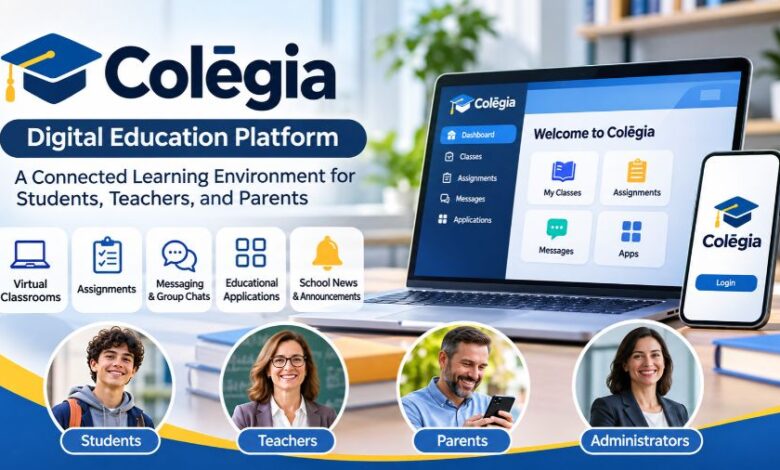
Colegia is a digital education platform designed to bring students, teachers, parents, and school administrators together through a connected online learning environment. Developed to support modern educational communities, Colēgia combines classroom access, learning applications, communication tools, school announcements, and academic resources in one digital platform. It is particularly associated with educational organizations in the United States and aims to simplify how schools manage communication and deliver learning experiences. Whether students need to access assignments, parents want to stay informed about academic progress, or teachers need a convenient way to connect with their classrooms, Colegia provides a centralized environment for these activities. Understanding how the platform works, its main features, login options, and potential benefits can help families and educators decide how to use it effectively.
What Is Colegia?
Colegia, officially styled as Colēgia, is a Digital Education Operating System (dēOS) developed to connect educational communities through technology. Associated with Academica, an education organization in the United States, the platform brings together digital learning applications, educational content, communication services, and classroom resources. Rather than requiring users to navigate several disconnected systems, Colegia provides a centralized environment where participating schools can organize different aspects of the learning experience. Its services support traditional classroom education, remote instruction, and hybrid learning arrangements. Students can access educational resources and virtual classrooms, teachers can communicate with their classes, and parents can stay informed about school activities. The platform is designed to make educational technology more accessible while helping schools coordinate their digital learning environments.
How Does Colegia Work?
Colegia works as a centralized digital environment that connects participating schools with their students, teachers, and families. Educational organizations use the platform to provide access to relevant applications, communication tools, classroom resources, and school information. Users typically sign in through an account associated with their educational institution, allowing them to access the services made available by their school. Depending on the institution’s configuration, the dashboard may include classroom applications, email, calendars, assignments, academic information, and other educational resources. Students can use these tools to manage their learning activities, while teachers and administrators can share updates and communicate with their communities. The exact services available may differ between schools, meaning that not every user will see identical features or applications.
Centralized Learning Environment
One of Colegia’s main purposes is to bring different educational resources together in one location. Students often need several digital tools to complete assignments, communicate with teachers, and participate in classroom activities. A centralized learning environment can make these resources easier to find and access. Through its educational application hub, Colegia allows participating institutions to organize supported learning applications and services within a connected digital experience. This approach can reduce the need to remember multiple application locations and help students navigate their school-related activities more efficiently.
School-Based Account Access
Colegia is generally accessed through credentials provided or authorized by a participating educational institution. Students and staff may use school-issued accounts, while parents and guardians can access designated family accounts. This arrangement helps schools connect users with the appropriate educational information and services. Account availability, permissions, and login requirements depend on the institution’s setup. Students should therefore use the credentials supplied by their school rather than assuming that a personal email address will automatically provide access.
Key Features of the Colegia Platform
Colegia combines several digital education features intended to support communication, classroom participation, and access to learning resources. Its official mobile application describes access to assignments, class bulletins, virtual classrooms, group chats, school news, and educational applications. Additional services can be available through participating schools and their selected integrations. These features make the platform useful as a central access point for different educational activities rather than a tool limited to one classroom function.
Assignments and Class Bulletins
Assignments and class bulletins help students stay informed about their academic responsibilities. Through the available school resources, students can review classroom information and access relevant learning activities. Teachers can use digital communication channels to share announcements and other important information with their classes. Having these resources accessible through a central platform can make it easier for students to keep track of school-related updates. However, the specific assignment management features depend on the applications and services connected by the educational institution.
Virtual Classroom Access
Virtual classroom access is an important part of Colegia’s approach to digital education. The platform supports Remote Live Instruction, which allows students to participate in real-time lessons from locations outside the physical school environment. This arrangement can help schools maintain classroom participation when students are learning remotely. Students can connect with teachers, follow lessons, and engage with available educational resources. Virtual instruction can also complement traditional classroom teaching by providing additional flexibility when schools use remote or hybrid learning arrangements.
Messaging and Group Chats
Communication is another central component of Colegia. Its messaging and collaboration features help students, teachers, and parents remain connected through school-related conversations. Group chats can support communication among classroom participants, while school updates help distribute important announcements. These tools can reduce dependence on scattered communication channels and make educational discussions easier to organize. Nevertheless, users should follow their school’s communication policies and avoid sharing private account information through messages.
Educational Applications
Colegia provides access to educational applications through its connected platform. Depending on the participating school, students may find learning management systems, academic tools, and other educational resources available from their dashboard. This centralized approach can simplify access to services that students regularly use for coursework and academic development. Some school communities also use applications such as Google Classroom, i-Ready, and IXL through their educational technology environment. Availability depends on the school’s selected services and account permissions.
School News and Announcements
School announcements allow educational institutions to communicate important information to their communities. Students and parents can use the available updates section to stay informed about school activities, events, and other developments. Receiving school information through a dedicated digital environment can make communication more organized, particularly for families managing several academic responsibilities. Users should still check official school communications for time-sensitive information and confirm important announcements directly with their institution when necessary.
Colegia Login: How Students and Parents Access Their Accounts
Accessing Colegia generally requires an account associated with a participating school. The platform provides separate access options for students, staff, and parents or guardians, helping different users reach the services relevant to their roles. Login requirements may vary depending on the educational institution, so users should follow the instructions provided by their school. Students and staff can use the designated login option, while parents and guardians can access their own account through the parent portal. Available sign-in methods may include supported third-party authentication options, depending on the account and platform configuration.
Student and Staff Login
Students and school employees can access their accounts through the student or staff login option. The usual process involves opening the Colēgia sign-in page, entering the school-associated email address, and providing the correct password. Some institutions issue specific account credentials during enrollment or employment. First-time users may also be asked to complete additional account security steps or change their initial password. If login details are unavailable, contacting the school’s technology department or administrator is generally the most reliable way to receive assistance.
Parent and Guardian Login
Parents and guardians have a dedicated account access option that helps them connect with their children’s educational activities. After signing in, available information may include school announcements, academic updates, and other services enabled by the institution. Some schools also provide access to student assessment information and gradebook features through the parent environment. Parents may need to complete an account setup process or connect their profile with their child’s student account before accessing these services. The school can provide the necessary instructions and account information.
What to Do If Colegia Login Is Not Working
Login problems can occur for several reasons, including incorrect passwords, outdated credentials, account restrictions, or temporary technical issues. Users should first verify that they are entering the correct school-associated email address and password. If the password has been forgotten, the available password recovery option can help initiate the reset process. Students and parents should also confirm that their accounts are active and that they are using the correct login portal. If the problem continues, contacting the school’s technology support team or the platform’s official support service can help identify the issue.
Colegia Mobile App: Access Education on Smartphones
The Colēgia mobile application extends the platform’s educational services to compatible smartphones. The official Android application is published by Colēgia LLC and is available through Google Play. Its listed capabilities include accessing assignments and class bulletins, entering virtual classrooms, creating group chats, reading school news, and opening educational applications. The app is intended to help students, teachers, and parents stay connected with their school communities without relying exclusively on desktop access. The official listing also identifies encrypted data transmission and provides information about data collection and deletion requests. Users should review the current application listing and privacy information before installation because app features, compatibility, and data practices can change.
Android and iPhone Availability
The Colēgia mobile experience is designed for smartphone users, with school communications indicating availability for Android and Apple mobile devices. Android users can look for the official application through Google Play, while iPhone and iPad users should check the Apple App Store for the official listing. Users should verify the developer’s identity before downloading an application to avoid installing an unrelated product with a similar name. Some features may require an active school account, and access can depend on the educational institution’s configuration.
Benefits of Using Colegia for Students, Parents, and Teachers
Colegia offers several potential benefits for educational communities by connecting learning resources and communication services within one digital environment. For students, centralized access can make it easier to find classroom information, assignments, and educational applications. Teachers can use communication tools to share updates and maintain connections with students. Parents can benefit from improved access to school announcements and available academic information. Educational administrators can also use the platform as part of their wider digital learning environment. These advantages are most meaningful when schools configure the available services properly and provide clear guidance to users. The platform does not automatically improve academic performance, but it can support more organized communication and access to educational resources.
Better Organization for Students
Students often manage multiple academic responsibilities, including assignments, classroom announcements, digital resources, and upcoming activities. A centralized platform can make these responsibilities easier to organize by reducing the number of separate places they need to check. Colegia provides a connected environment where students can access the learning tools and information made available by their schools. This can support more consistent engagement with classroom activities and help students remain aware of important academic updates.
Improved Parent-School Communication
Parents play an important role in supporting their children’s education, but staying informed can sometimes be challenging when school information is distributed across several channels. Colegia provides communication features that help participating schools share announcements and relevant updates with families. Parent access can also make certain academic information easier to review. These services can support stronger communication between families and educational institutions, although the exact information available depends on the school’s settings and permissions.
Flexible Learning Opportunities
The platform supports educational environments that combine physical classrooms with remote and hybrid instruction. This flexibility can help institutions provide learning opportunities when students cannot attend lessons in person or when alternative teaching arrangements are required. Remote Live Instruction allows students to participate in real-time educational activities from different locations. Digital classroom resources can also complement traditional instruction, giving schools additional options for organizing teaching and learning.
Colegia and Modern Digital Education
Digital education platforms have become an important part of how schools organize learning resources and communicate with families. Educational institutions increasingly rely on learning management systems, online classrooms, communication applications, and digital assessment tools. Colegia brings several of these functions into a connected environment, helping schools coordinate their educational technology resources. Its Digital Education Operating System concept reflects an approach in which different applications and services work together rather than operating as completely separate systems. This can be particularly relevant for schools supporting traditional, remote, and hybrid learning models. However, the effectiveness of any digital education platform depends on implementation, teacher participation, student access, technical support, and the quality of the educational resources being used.
Challenges and Limitations of Colegia
Although Colegia offers useful educational features, users may experience limitations related to technology, account access, and the availability of individual services. Students and parents generally depend on their schools to provide active accounts and configure the necessary permissions. This means that some features may be unavailable to users whose institutions have not enabled them. Internet connectivity and compatible devices are also important for accessing online classrooms and other digital resources. Mobile application reviews have included complaints about delayed notifications, message visibility, and access to certain functions. Such feedback does not establish that every user experiences these problems, but it highlights why technical reliability and responsive support matter. Schools should provide clear account instructions and alternative communication methods for important announcements when digital services are unavailable.
Is Colegia Safe for Students and Parents?
Privacy and security are important considerations for any platform that handles educational information and serves younger users. The official Colēgia Android application listing reports encrypted data transmission and provides information about the categories of data the developer may collect. It also indicates that users can request deletion of their data. These disclosures provide useful information, but they should not be interpreted as a complete independent security audit or a guarantee that every aspect of the service is risk-free. Parents and students should review the platform’s privacy policy, understand which information is collected, and use strong account passwords. Schools should also explain account permissions, data handling practices, and appropriate communication guidelines to their communities.
The Future of Colegia in Digital Learning
The future relevance of Colegia will depend on how effectively it adapts to changing educational requirements and technology expectations. Schools increasingly need platforms that support communication, flexible instruction, academic resources, and access across different devices. Colēgia’s connected education model provides a foundation for bringing these services together in one environment. Continued improvements in application reliability, accessibility, account management, and privacy practices could strengthen its usefulness for educational communities. Its long-term value will ultimately depend on whether students, parents, teachers, and administrators find the platform reliable and practical for their everyday educational needs.
Conclusion
Colegia is a digital education platform designed to connect students, teachers, parents, and schools through centralized learning resources and communication tools. Its combination of virtual classroom access, assignments, group messaging, school announcements, and educational applications makes it a useful option for institutions supporting connected and flexible learning environments. The platform also provides mobile access, helping users stay connected with school activities beyond desktop computers. However, its available features depend on each institution’s configuration, and users should consider account requirements, privacy information, and technical reliability. Overall, Colegia represents an approach to modern education in which digital tools work together to support communication, classroom participation, and access to learning resources.
Also read: Recent Bookings: How Booking Dashboards Improve Business Operations
FAQs
1. What is Colegia used for?
Colegia is used to access educational applications, classroom assignments, virtual lessons, school announcements, and communication tools through one connected digital learning environment.
2. Is Colegia free to use?
The official Colēgia mobile application is free to download, but access to its educational services generally depends on an account provided by a participating school.
3. How do students log in to Colegia?
Students typically visit the Colēgia login page, enter their school-associated email address and password, and follow any additional security instructions.
4. Does Colegia have a mobile app?
Yes, Colēgia offers an official mobile application for Android, with Apple mobile access also supported through its iPhone and iPad app availability.
5. Can parents use Colegia?
Yes, parents and guardians can access designated accounts to view available school announcements, educational updates, and academic information associated with their children.
6. Is Colegia safe for students?
Colegia reports encrypted data transmission and provides privacy disclosures, but families should review its privacy policy and follow their school’s account security guidance.